Food & Drink·Jumeirah, Dubai
TableWise·Restaurant
QR menu and table ordering for restaurants, with a live order board for the kitchen.

Fictional business, sample data. Ember & Fig is not a real business and every record in the demo is sample data. Everything you do in the demo stays in your own browser: nobody else sees it and nothing reaches a real business. AI features show sample output in the demo.
Customer view, on the guest's phone.
- 01Scan the table QR and browse a 24-dish menu with dietary tags
- 02Add dishes with quantity and a kitchen note, then place the order
- 03Track the order live: Received → Preparing → Ready → Served
- 04Call the waiter or request the bill with one tap
- 05Sold-out dishes are hidden from the menu automatically
The dashboard the owner and staff run the day from.
- 01Live order board (New, Preparing, Ready, Served) with one-tap status buttons
- 02Waiter and bill requests land on the board with a Done button
- 03Overview KPIs, 14-day revenue, orders by hour and top dishes
- 04Menu: inline price edits, Sold out toggle, AI dish from a photo (demo)
- 0512 tables with real QR codes, SVG download and Print all
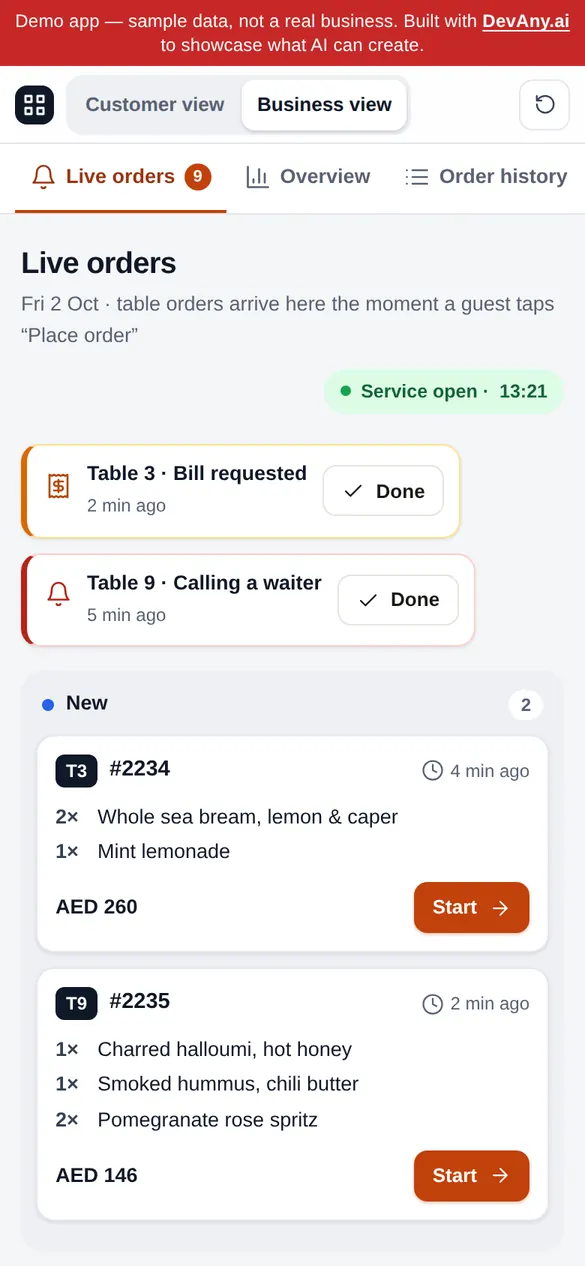
Three steps in the live demo to see how the two views connect.
- Step 1In Customer view, add a dish to the cart and tap Place order
- Step 2Switch to Business view: your order is in New on the live board; move it to Ready
- Step 3Switch back to Customer view: the order tracker now shows Ready
- Ember#C2410C
- Ink#1A1714
- Cream#FAF7F2
- Olive#3E5A44
- One app, two views
- Customer and business live in the same app: a record created on one side appears on the other at once.
- Blueprint
- The same app lives in the ideas library; the build button carries its full brief into the builder.TableWise →
- Hosting
- Runs on its own subdomain inside a sandboxed frame; paid plans can connect a custom domain.demo-tablewise.devany.app ↗ (opens in a new tab)
The builder opens prefilled with the full TableWise brief. Add your business name, services and prices, and let DevAny build the rest.